
Confirm availability
Self-service setup is in controlled rollout. Confirm your organization is enabled before scheduling a change.
For IT administrators and security reviewers
Let approved employees use their Microsoft work accounts. Connect each identity to the right Evidize user, then control access with organization permissions and product roles.
Free 30-minute Teams demo. Use our example or bring your workflow.
Self-service SSO setup is in controlled rollout. Confirm availability for your organization.
Choose a view to see what your team can do and what carries into the next step.
Workflow illustration
Evidize administrator
Start from Team & access and confirm which Microsoft tenant your organization will use.
Microsoft administrator
Use a supported tenant-administrator account to verify the tenant and review identity-only consent.
Evidize administrator
Confirm the intended tenant before linking approved members. Outlook and mailbox permissions are configured separately.
An Evidize organization administrator starts setup. A supported Microsoft administrator verifies the tenant and reviews the identity-only consent.
What you work with
What carries forward
Complete the tenant and consent checks before activating access. Outlook and mailbox permissions are configured separately.
Workflow illustration
Evidize administrator
Confirm the person has an active Evidize account and the product role they need.
Evidize administrator
Select the known Microsoft account or verify its Object ID in the connected tenant. Matching email text alone does not establish a binding.
Pilot users
Complete the administrator sign-in test before activation, then pilot an approved standard user and confirm the recovery route before requiring SSO.
Review approved members and link their Microsoft identity. The Tenant ID and user Object ID identify the account; a matching email address is not enough.
What you work with
What carries forward
Test the linked administrator and an approved standard user before requiring SSO. Provisioning is configured separately from sign-in.
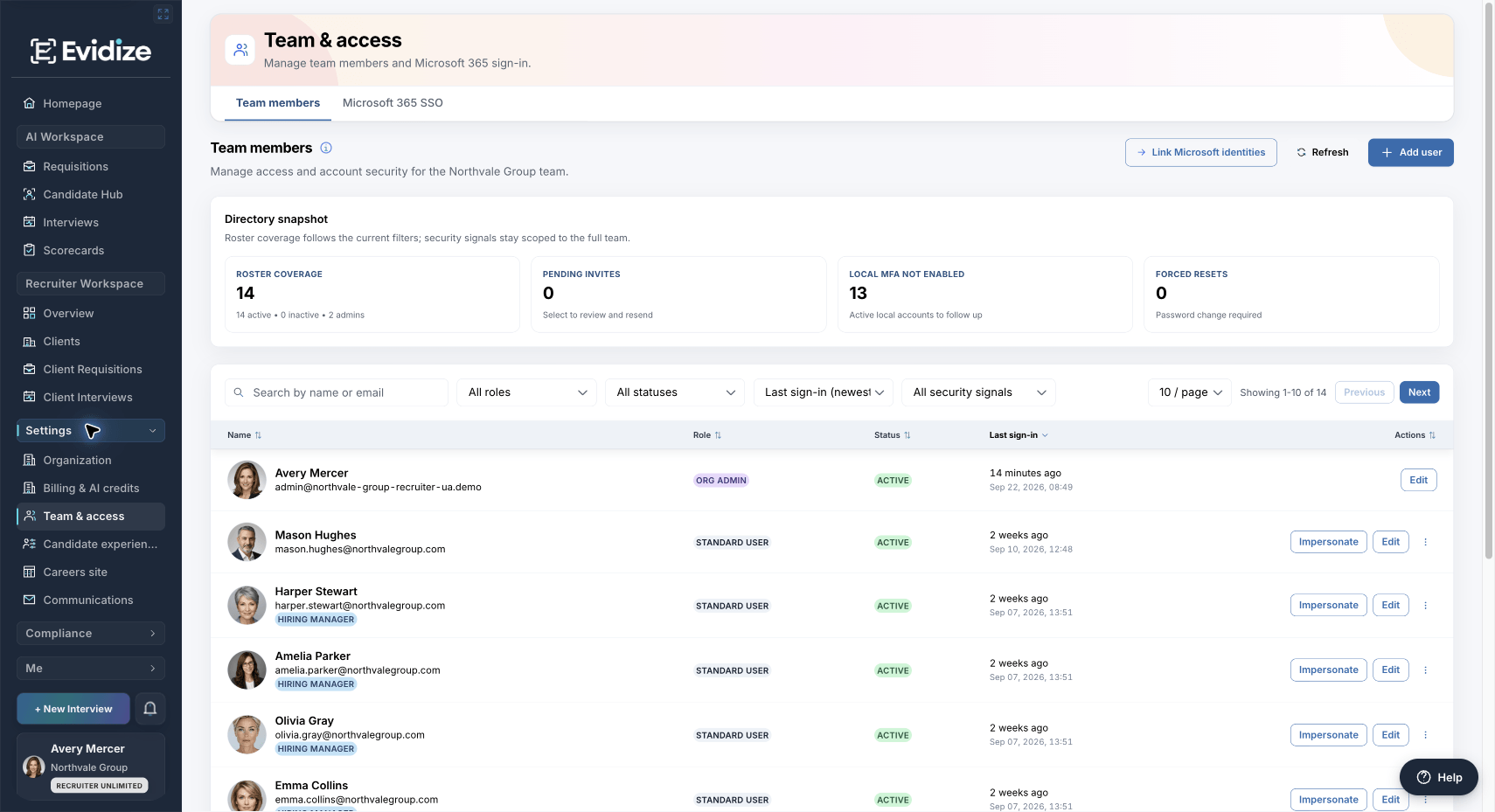
Review Amelia Parker’s Standard User role, enabled account and organization-default candidate-page preferences before saving changes.
Open a member’s role and access settings to review their product role, enabled status and candidate-page preferences. Microsoft authentication does not assign product administrator access.
What you work with
What carries forward
Review roles when responsibilities change. For offboarding, deactivate Evidize access and remove or disable Microsoft access.
Two systems, clear responsibilities
Microsoft Entra
Your configured Microsoft policies verify the work account.
Evidize
Validate the linked user, organization, role and active access.
Hiring workspace
Keep the available workspace within that person’s permissions.
Rollout readiness
Plan the pilot with your IT and Evidize administrators before changing how employees sign in.
Self-service setup is in controlled rollout. Confirm your organization is enabled before scheduling a change.
Bring an active Evidize organization administrator and a supported Microsoft tenant administrator. They can be different people.
Test the linked administrator and an approved standard user. Verify the intended tenant, user mappings and product roles.
Keep a working sign-in method during the pilot and agree an owner-verified recovery contact before requiring SSO.
One Microsoft tenant per Evidize organization, and one Evidize organization per tenant in each environment. Personal Microsoft accounts are not supported. Provisioning is configured separately from employee SSO.
For your technical review
Microsoft verifies the work identity. Evidize controls access to the organization and its product records.
| Control | Microsoft Entra | Evidize |
|---|---|---|
| Sign-in | Authenticates the work account. Microsoft passwords remain with Microsoft. | Checks the returned identity, approved organization and explicit user binding. |
| MFA and access policies | Applies MFA, Conditional Access and application assignment where licensed, configured and assigned. | Applies its own account, organization, role and session checks. |
| Product permissions | Microsoft administrator status does not grant an Evidize administrator role. | Organization administrators approve members and assign Evidize roles; provisioning is configured separately. |
| Integration access | Employee SSO consent covers identity information. | Outlook scheduling, mailbox access and candidate check-in have separate setup and access boundaries. |
Before you get started
See the setup, responsibilities and plan requirements before you decide.
Compare plans and capabilitiesYes, where SSO setup is enabled for your organization. You can retain permitted password access alongside Microsoft SSO or require SSO after a successful administrator pilot. Confirm availability, member mappings and a recovery contact before enforcement. Review the pilot steps
No. SSO consent alone does not create Evidize users, link identities or assign product roles. Provisioning, including available SCIM controls, is configured separately. Approved users need an active Evidize account, an appropriate product role and an explicit Microsoft identity binding before they can sign in.
Your Microsoft administrators manage those policies in Microsoft Entra, where licensed, configured and assigned. Evidize uses the resulting Microsoft authentication and applies its own user, organization, role and session checks. Local MFA indicators in the team directory are separate from Microsoft MFA policy.
For a new member, provision the account, assign its Evidize role and check the Microsoft identity binding. Review product permissions when responsibilities change; a Microsoft administrator role does not confer an Evidize role. For offboarding, deactivate the Evidize user and remove or disable Microsoft access.
Microsoft and Evidize have separate session lifetimes. Revoking a Microsoft session or changing Microsoft policy does not necessarily end an already-issued Evidize session immediately. Deactivate the user in Evidize as well; a request already in progress may complete before revocation takes effect.
Employee sign-in uses identity information. It does not grant mailbox access. Outlook appointment setup is a separate integration, and candidate check-in is a separate journey. Evidize permissions determine which hiring records an employee can open. Review Microsoft and candidate privacy
See it with your team
Walk through Microsoft sign-in, identity linking and product roles with your technical team. Bring your requirements if useful; a prepared example is available.
Book a technical walkthroughFree 30-minute Teams demo. Use our example or bring your workflow.