
For recruiters and hiring managers
Build a shortlist you can explain.
Compare candidates, focus your interviews, and explain your shortlist—with role criteria, candidate evidence and interview guidance in one workspace.
Free 30-minute Teams demo. Use our example or bring a role.
Customer Success Manager
Demo walkthroughFollow the same hiring example.Start with Camille and Adrian’s comparison. Explore how the role, questions and next step connect.
Set the standard for the role.
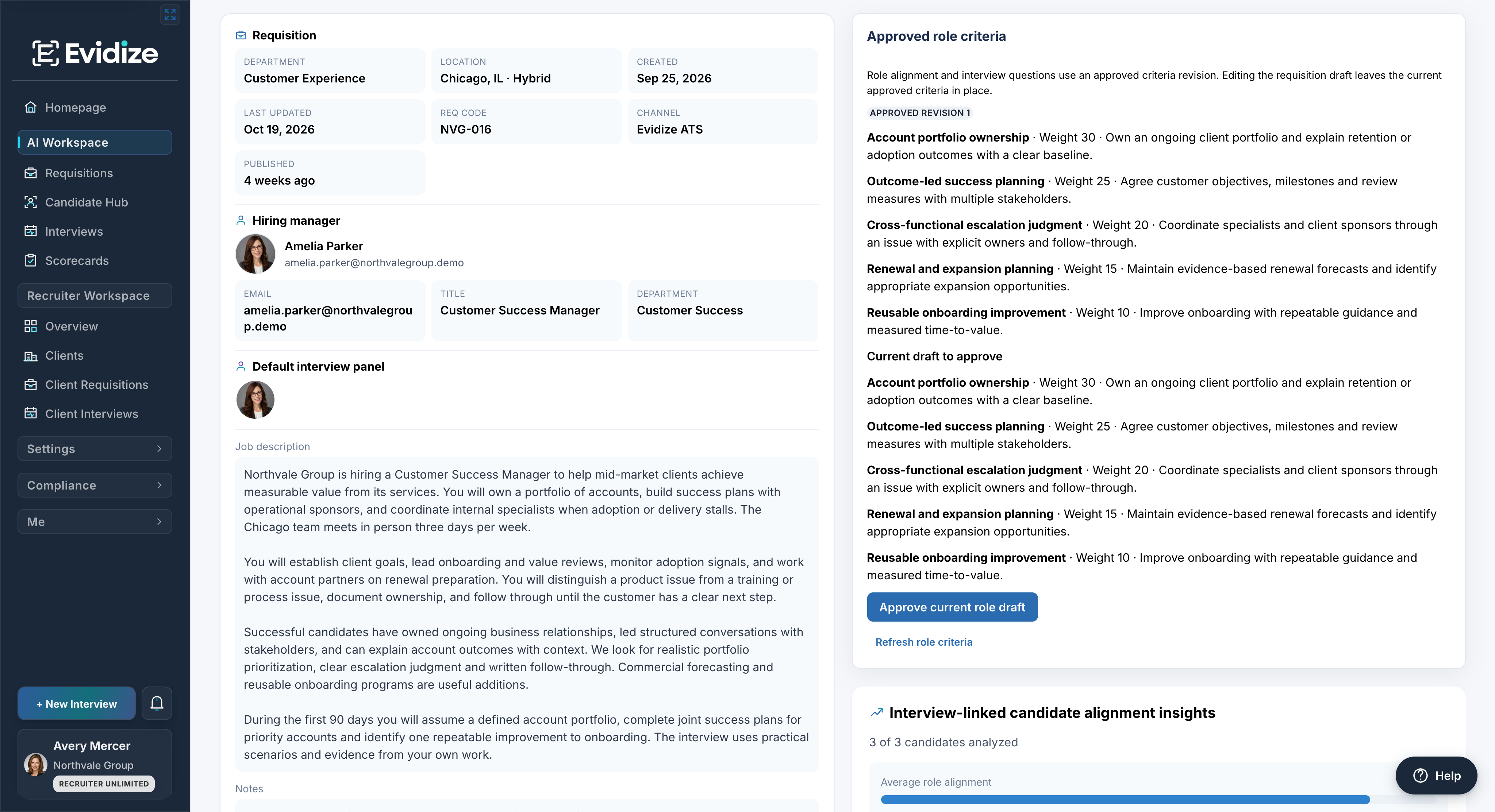
Start with the role: portfolio ownership and success planning carry the highest weights in this example.
For this Customer Success Manager role, the team has approved five criteria. Review the role brief and decide how much each requirement matters before screening begins.
What you work with
- Role brief
- Approved criteria
- Criterion importance
What carries forward
Five agreed role criteria
Portfolio ownership, success planning, escalation, renewals and onboarding give this review a shared standard.
Put the evidence side by side.
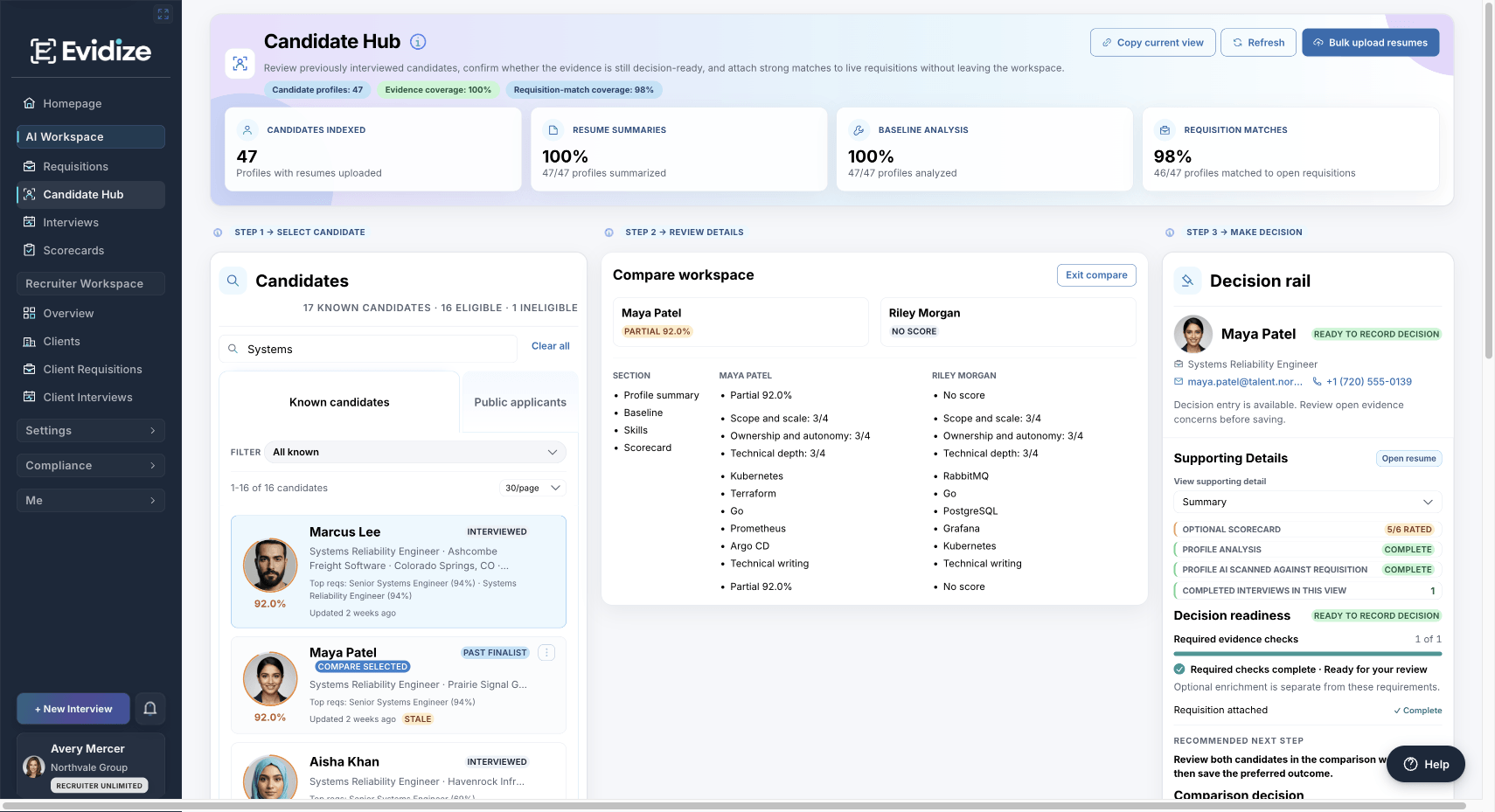
Compare the candidates: Camille and Adrian’s Customer Success Manager records show the same evidence categories side by side.
Camille and Adrian are being reviewed for the same role. Compare experience, skills and available interview evidence, then open the supporting record before choosing the next conversation.
What you work with
- Résumé summaries
- Skills and experience
- Interview scorecards
What carries forward
A comparison with context
Relevant experience and available scorecard evidence remain visible beside each profile.
Ask about the work that matters.
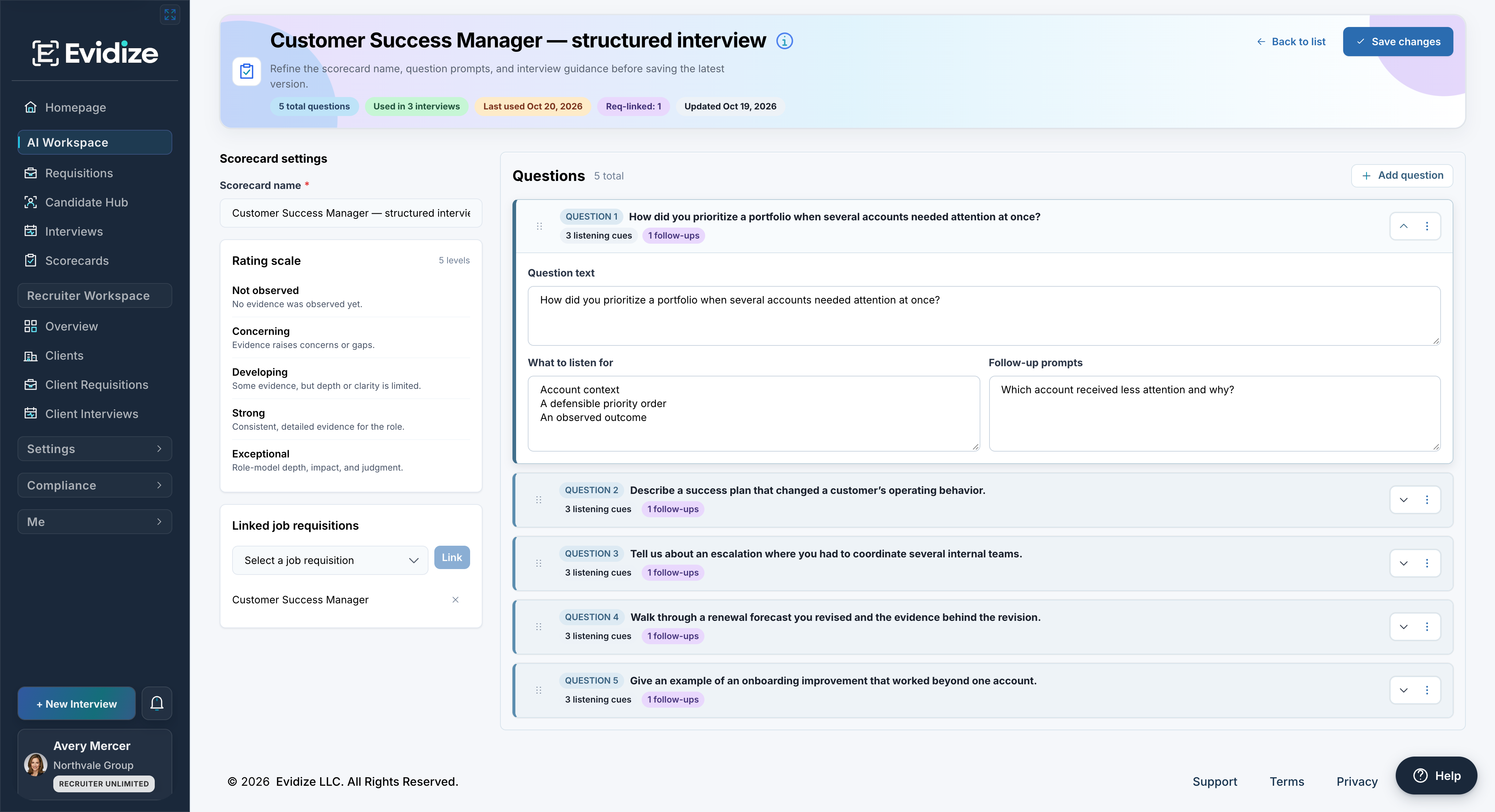
Prepare the interview: the scorecard for this role gives interviewers questions, listening cues and follow-ups.
The Customer Success Manager scorecard turns the role requirements into five interview questions. Review and edit the questions, listening cues and follow-ups before the conversation.
What you work with
- Editable questions
- Listening cues
- Follow-up prompts
What carries forward
A shared interview plan
Questions, rating guidance and follow-ups help your team probe the work that matters.
Make the next move with the full context.
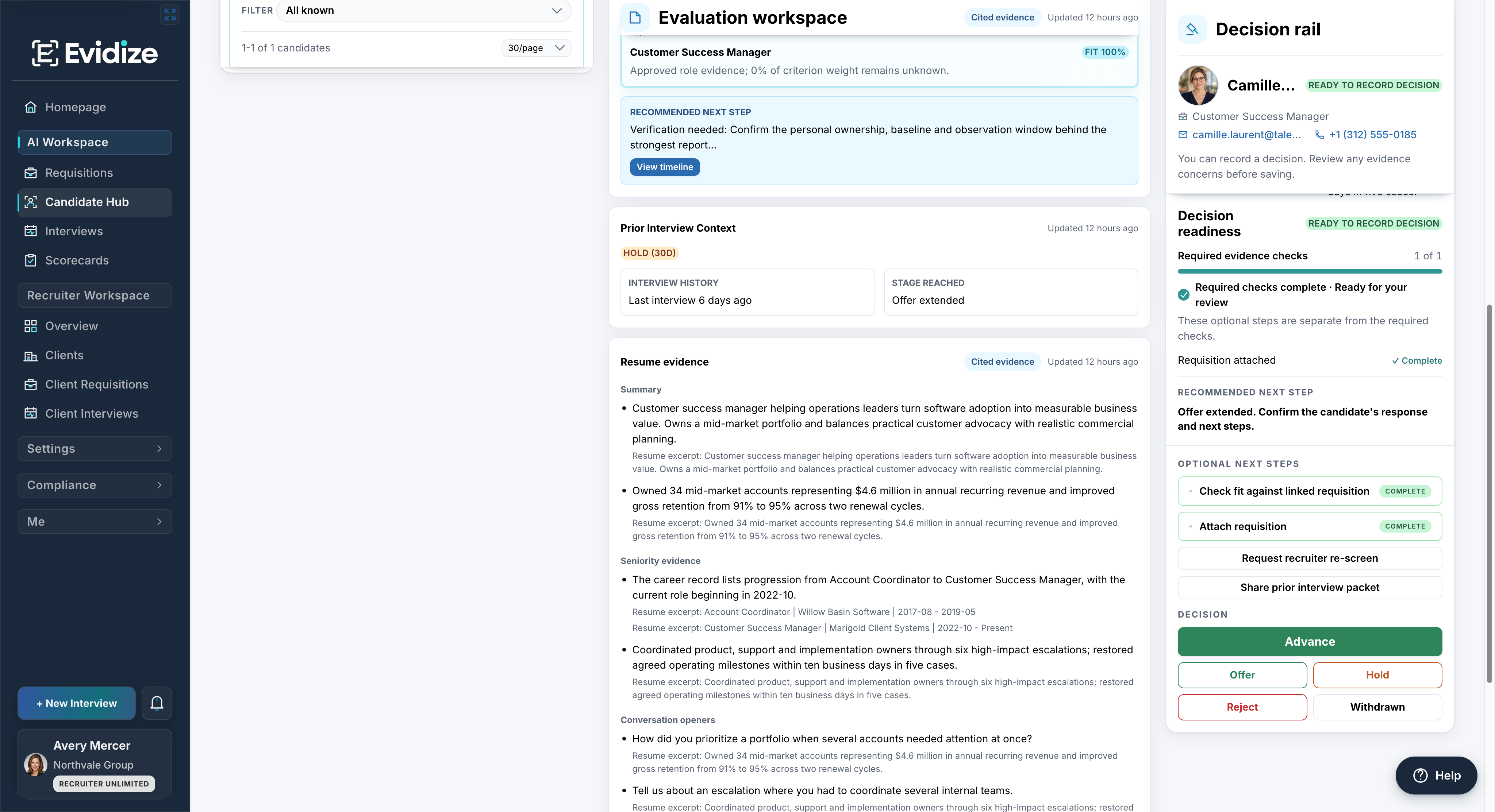
Review the next action: Camille’s record keeps readiness checks and evidence beside the reviewer’s decision controls.
Review role alignment and what still needs verification. Your team chooses the outcome and records the rationale in the decision workflow.
What you work with
- Role-aligned evidence
- Verification items
- Decision rationale
What carries forward
A reviewer-owned next step
The evaluation and verification needs stay available as your team records its next action.
Evidence you can actually review
The summary is the starting point.
Open the source. Explore the question. Keep the next step with the record.
Trace the sourceRead résumé excerpts alongside the summaries they support.
Focus the follow-upUse conversation starters and verification items to guide the interview.
Keep the decision yoursReview the context and record the reasoning behind your next action.
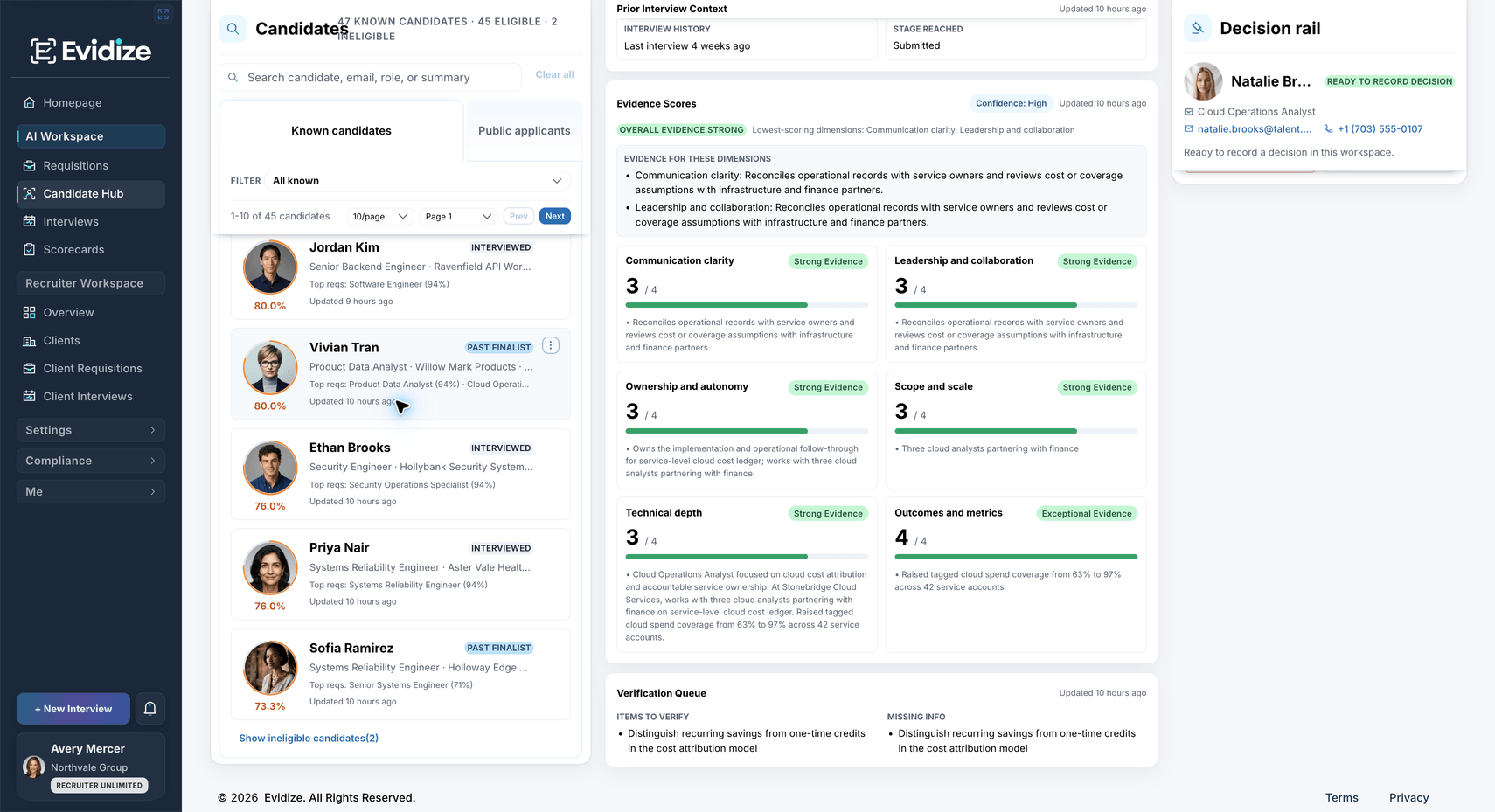
Source excerpts, suggested follow-ups and verification items remain available in the candidate record.
AI analysis supports your review. Your team makes every hiring decision. Missing information is a reason to ask a question; it doesn’t establish a lack of ability.
A few useful answers
Make it work for your hiring team.
You can explore a prepared workflow before bringing your own role or candidate information.
Explore plans and capabilitiesWhat do we need to get started?
Start with a role brief and agree on what the interview should establish. Review the suggested criteria, questions and summaries for relevance. For a demo, we can use a prepared example; bringing your own role is optional.
Can it help with specialist interviews?
Role-specific questions, listening cues and follow-up prompts give interviewers a structured starting point. Your team reviews and edits the guidance, and brings in qualified specialist review where needed.
Can we keep our existing ATS?
Yes. Evidize can work alongside your ATS without requiring a built-in connection. Intake, access and the movement of information depend on your plan and setup. We’ll walk through the workflow with you in the demo.
Does Evidize decide who gets shortlisted?
Your hiring team owns the shortlist. Evidize helps organize evidence and guide review; it does not automatically advance or reject candidates. Review the source information and record the reasoning behind your next step.
Which plans include these workflows?
Core and Enterprise include Candidate Hub and structured scorecards. Recruiting plans also include these workflows. Bulk intake and ATS access have separate requirements. Compare plan capabilities.
See it with your next role
A clearer shortlist starts here.
Walk through the criteria, comparison and interview plan with us.
Book a shortlist demoFree 30-minute Teams demo. Use our example or bring a role.